Liqoria 1.4 Adds macOS Dock Player in Dynamic Island style, Hide in full screen and more
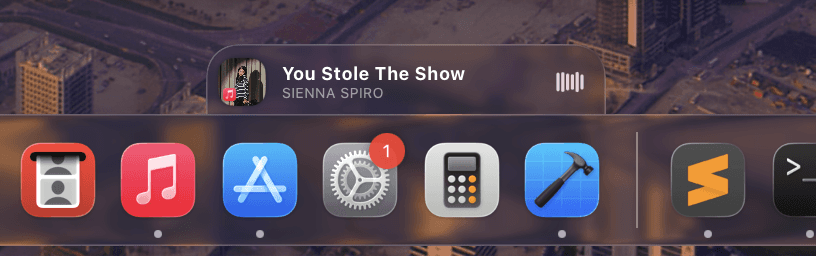
Liqoria 1.4 - macOS Dock Player, Hide In Fullscreen, More Native Control
Liqoria 1.4 takes a different direction.
Instead of adding more layers on top of macOS, it moves music control to where it actually belongs.
The Problem with Notch/Dynamic Island Apps on Mac
Notch-style apps on macOS including my own app, DynamicLake try to bring Live Activities to the Mac.
But on macOS, this creates friction.
The menu bar is one of the most important areas of the system, and notch apps sit directly on top of it.
In many situations, the music live activity ends up hiding parts of the menu bar, blocking interactions, and making simple actions feel more complex than they should be.
Even basic actions like checking controls or interacting with your Apple Music queue can become less accessible.
Even when it works, it doesn’t always feel natural.
Dock Player – Music Control Inside the macOS Dock in Dynamic Island style
Liqoria 1.4 introduces the Dock Player
Your music from Apple Music, Spotify for Mac, YouTube, and browser players is now controlled directly from the macOS Dock.
No overlays
No menu bar conflicts
No extra layers
Just a clean, native experience inside the Mac Dock.
Support for left and right macOS Dock orientations is coming very soon.
Customize How the Dock Player Works
Liqoria gives you full control over how the Dock Player behaves.
With the new Dock Player settings, you can adjust how it appears, reacts, and fits into your workflow whether you're using Apple Music daily or switching between Spotify for Mac and other players.
It’s your Mac Dock, your rules.
Smarter Behavior, Less Noise
Liqoria 1.4 removes distractions instead of adding them.
Hide in full-screen apps so nothing gets in your way
Automatically hide the floating player when no music is playing
Disable haptic feedback if you prefer a quieter experience
Everything adapts to you.
Still the Best Music Control for Mac
Liqoria continues to make music control feel instant.
Control your Apple Music queue faster
Manage playback on Spotify for Mac without switching apps
Keep your music always accessible from the macOS Dock
Now with the macOS Dock as a core part of the experience.
No conflicts with the menu bar
No unnecessary overlays
Just fast, direct control from the Mac Dock
Try Liqoria 1.4
This is just the first version of the Liqoria macOS Dock Player many more features and customization options are coming soon
If you want your Apple Music or Spotify for Mac experience to feel like part of macOS instead of something on top of it, Liqoria 1.4 delivers exactly that.
Works with Apple Music, Spotify for Mac, YouTube and more
The macOS Dock is no longer just for apps now it’s where your music lives